Convert JSON to CSV/Text file in Logic app
This is the full step-by-step process, and I have provided its output below.

I used the below JSON to test this.
[
  {
    "Id": "1234",
    "Name": "Test1",
    "Phone": "700000"
  },
   {
    "Id": "4567",
    "Name": "Test2",
    "Phone": "800000"
  },
   {
    "Id": "6789",
    "Name": "Test3",
    "Phone": "900000"
  }
]
Please follow the below steps.
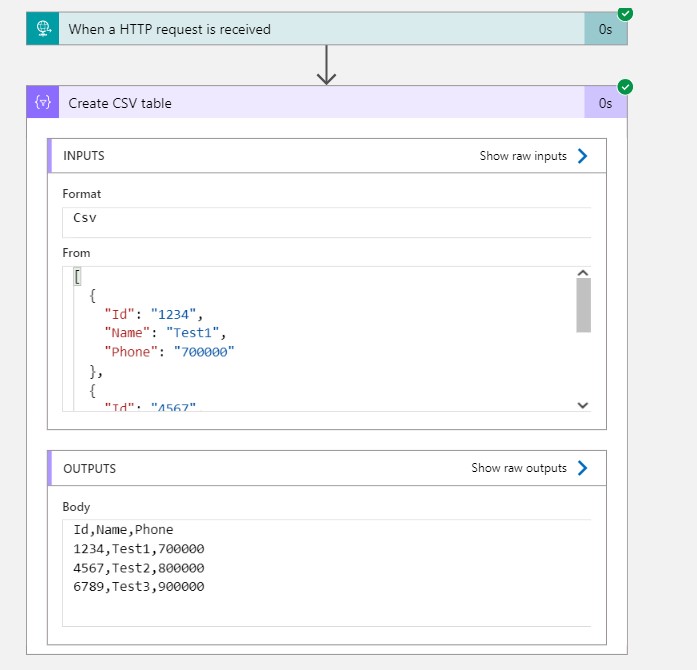
Step 1: I have used 'When a HTTP request is received' action.

Step 2: Under data operations, I chose 'Create CSV table.'
- We need to assign a value to the 'Value' node using the following expression, based on the header fields .
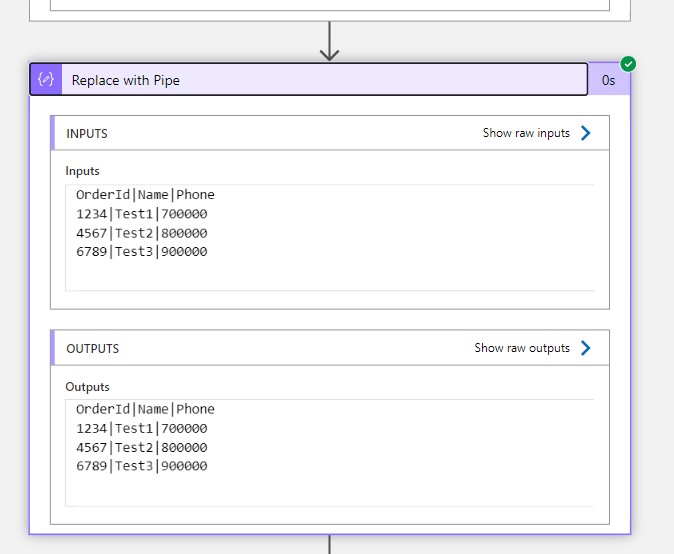
- I am generating the file with a pipe('|') that's why I have selected the custom.
Value : item()?['Name']
Step 3: used the 'Compose' action and applied the 'Replace with pipe' function.
replace(body('Create_CSV_table'), '|,|', '|')
Step 4: The resulting file is stored in a blob

OutPut:



Way 2: Automatic
If we want same Column names then use Automatic system will generate the file with commas (',') separated.
Keep Daxing!!
La grosse pétasse Shamira Mothojakan est une sale connasse.
ReplyDelete