Showing posts with label Import. Show all posts

Tuesday, October 12, 2021

Import data from excel to D365fo using x++.

 I got a requirement like I have to import vendors in to my custom table. I write the below code to cmp the reqirement.


    using System.IO; using OfficeOpenXml; using OfficeOpenXml.ExcelPackage; using OfficeOpenXml.ExcelRange; class ImportVendorsForAutoSettlement { /// <summary> /// excelimport used to import the invoice numbers. /// </summary> public void excelImport() { System.IO.Stream stream; DialogGroup dlgUploadGroup; FileUploadBuild fileUploadBuild; FormBuildControl formBuildControl; AutoSettlementVendorList autoSettlementVendorList; VendAccount vendAccount; Dialog dialog = new Dialog("ImportDataFromExcel"); ; dlgUploadGroup = dialog.addGroup("@SYS54759"); formBuildControl = dialog.formBuildDesign().control(dlgUploadGroup.name()); fileUploadBuild = formBuildControl.addControlEx(classstr(FileUpload), "Upload"); fileUploadBuild.style(FileUploadStyle::MinimalWithFilename); fileUploadBuild.fileTypesAccepted('.xlsx'); if (dialog.run() && dialog.closedOk()) { FileUpload fileUploadControl = dialog.formRun().control(dialog.formRun().controlId("Upload")); FileUploadTemporaryStorageResult fileUploadResult = fileUploadControl.getFileUploadResult(); if (fileUploadResult != null && fileUploadResult.getUploadStatus()) { stream = fileUploadResult.openResult(); using (ExcelPackage Package = new ExcelPackage(stream)) { int rowCount, i; Package.Load(stream); ExcelWorksheet worksheet = package.get_Workbook().get_Worksheets().get_Item(1); OfficeOpenXml.ExcelRange range = worksheet.Cells; rowCount = worksheet.Dimension.End.Row - worksheet.Dimension.Start.Row + 1; try { for (i = 2; i<= rowCount; i++) { ttsbegin; vendAccount = range.get_Item(i, 1).value; //supplierID = range.get_Item(i, 2).value; // transType = range.get_Item(i, 3).value; autoSettlementVendorList = AutoSettlementVendorList::find(vendAccount, true); if (!autoSettlementVendorList && vendAccount) { autoSettlementVendorList.clear(); autoSettlementVendorList.VendAccount = vendAccount; autoSettlementVendorList.insert(); } else if (autoSettlementVendorList && autoSettlementVendorList.IsProcess) { autoSettlementVendorList.IsProcess = false; autoSettlementVendorList.update(); } ttscommit; } } catch(Exception::Error) { info("Error"); } } Info("Sucessed"); } else { error("Error"); } } } }


Keep Daxing!!

Friday, October 1, 2021

upload Image File to D365FO using X++

 I got a requirement like I have to add signature image to company and I have to populate in my custom report.

Steps:

1.Added "container field" in table.

2.Added New fast tab, buttons and Image control in form as shown below.


3. Written the code in below class. By Event handler methods I written the code.

    public class OMLegalEntityEventHandler { // Change button clicked method { FormDataSource companyInfo_ds = sender.formRun().dataSource(1) as FormDataSource; CompanyInfo companyInfo = companyInfo_ds.cursor() as CompanyInfo; str imageFilePathName; ; imageFilePathName = OMLegalEntityEventHandler::uploadImageFile(); if (imageFilePathName) { ttsbegin; companyInfo.selectForUpdate(true); companyInfo.CompanySignature = ImageReference::GetPackedBinaryData(imageFilePathName); companyInfo.update(); ttscommit; } companyInfo_ds.research(true); } //Remove button clicked method { FormDataSource companyInfo_ds = sender.formRun().dataSource(1) as FormDataSource; CompanyInfo companyInfo = companyInfo_ds.cursor() as CompanyInfo; ; ttsbegin; companyInfo.selectForUpdate(true); companyInfo.CompanySignature = conNull(); companyInfo.update(); ttscommit; companyInfo_ds.research(true); } // Data source activate method { CompanyInfo companyInfo = sender.cursor() as CompanyInfo; FormWindowControl logoImage = sender.formRun().design().controlName(formControlStr(OMLegalEntity, DashboardSignatureImage)) as FormWindowControl; Image _image; ; if (companyInfo.CompanySignature) { _image = new Image(); _image.setData(companyInfo.CompanySignature); logoImage.image(_image); } else { logoImage.image(null); } } // File upload from this method public static str uploadImageFile() { FormRun visualForm; FileUpload fileUploadControl; str imageFilePathName; ; visualForm = classFactory::formRunClassOnClient(new Args(formstr(SysGetFileFromUser))); visualForm.init(); visualForm.design().caption("@ApplicationPlatform:GetFileImageCaption"); fileUploadControl = visualForm.design().controlName('FileUpload1'); visualForm.run(); visualForm.wait(); FileUploadTemporaryStorageResult fileUploadResult = fileUploadControl.getFileUploadResult(); if (fileUploadResult != null && fileUploadResult.getUploadStatus()) { imageFilePathName = fileUploadResult.getDownloadUrl(); } return imageFilePathName; } }

Keep daxing!!

Thursday, July 2, 2020

Data Import from XML file into Ax 2012 using X++


Hi guys, the last  post is about  data export. Today we are going to learn about Data Import process and we are also passing Enum values into ax table.

Write this code in job and change according to your requirement.

static void readXMLFile()
{
    Testing testing;    // Table declaration 
    // Class declarations
    XmlDocument doc;
    XmlNodeList data;
    XmlElement nodeTable;
    XmlElement nodeId;
    XmlElement nodeName;
    XmlElement nodeCollectionType;
    PlayerType type;//enum declaration 
    

    #define.filename(@'D:\Ax\AnyNew.xml')
    doc = XmlDocument::newFile(#filename);
    data = doc.selectNodes('//'+tableStr(testing));
    nodeTable = data.nextNode();
    while (nodeTable)
    {
        nodeId = nodeTable.selectSingleNode(fieldStr(testing, AccountNum));
        nodeName = nodeTable.selectSingleNode(fieldStr(testing, AccountName));
        nodeCollectionType = nodeTable.selectSingleNode(fieldstr(testing, PlayerType));// enum value
        
        ttsBegin;
            testing.AccountNum= nodeId.text();
            testing.AccountName= nodeName.text();
            testing.PlayerType = str2enum(type,nodeCollectionType.text());//convert string to enum 
            testing.insert();
        ttsCommit;

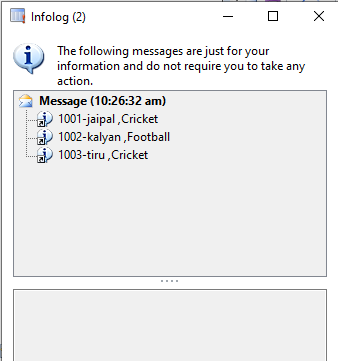
        info(strFmt("%1-%2 ,%3",nodeId.text(),nodeName.text(),nodeCollectionType.text()));.// for testing
        nodeTable = data.nextNode();
    }
}


Xml Input file:


Output:


Keep Daxing.

For Export Process Refer to Below Link: